
Track spending and split bills on iPhone
Set up Apple Pay or Monobank once, and every purchase is added for you.
You can start without an account, and it works offline.
Home
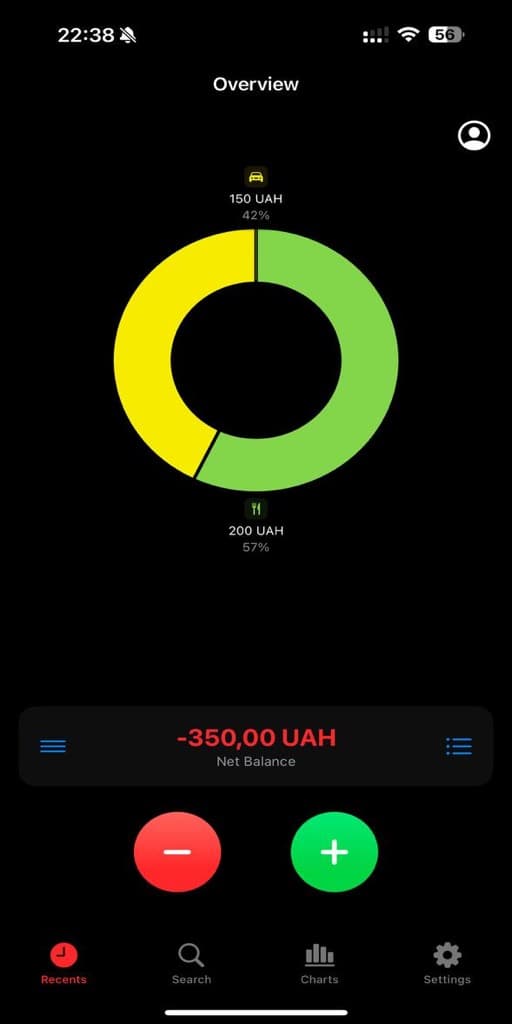
This month's spending by category, with Scan and Voice buttons beside it.
Home
This month's spending by category, with Scan and Voice buttons beside it.
Getting started
How it works
Download
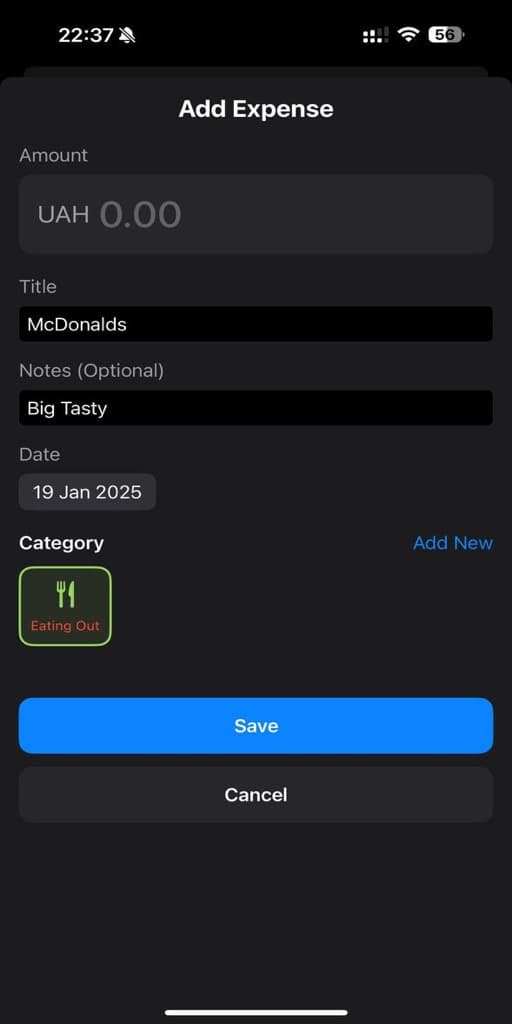
Add your first expense right away, without an account.
Connect how you pay
Set up Apple Pay or Monobank, or import a PrivatBank, Wise or BVR statement.
Check your month
Analytics shows where the money went. Planning shows what's left to spend.
Features
What Fundeer does
Add card purchases from Apple Pay or Monobank, and cash by voice or a receipt photo.
Apple Pay
Set it up once, and every payment is added with the merchant and currency.
Voice and receipts
Say "coffee, 45", or photograph a receipt and the total is filled in.
Banks
Connect Monobank directly, or import a statement from PrivatBank, Wise, BVR or another bank.
Trips and family
Add shared costs, and Fundeer works out who owes whom.
Analytics
A financial health score, spending by category and your net worth.
Budgets and goals
Category limits, savings goals and what's safe to spend this month.
In practice
Three common cases
A trip with friends
Five friends spend a week in Barcelona, and each pays for something different: the hotel, dinners, taxis.
Everyone adds what they paid to one shared trip. At the end, Fundeer shows who pays whom back.
A couple sharing costs
Two people split rent and groceries but keep the rest of their spending separate.
Shared costs go into a family budget you both see. Everything else stays in your own budgets.
Small everyday purchases
Coffee, lunch and snacks every day, and no time to write any of it down.
Apple Pay purchases are added for you. For cash, say "coffee, 65" or photograph the receipt.
Updates
What's new
16 releases since February 2025.
A keypad with a calculator, PDF and Excel reports, and simpler Apple Pay set-up
- Apple Pay logging is simpler to set up, and every payment it added is listed in Settings → Apple Pay.
- Statement import recognises Monobank, PrivatBank, Wise and BVR statements on its own. Settings → Manual Import.
- Budget alerts, and a weekly summary on Sunday evening. Turn them on in Settings → Notifications.
- PDF and Excel reports for trips, family budgets and transactions.
- A large keypad with a calculator for adding spending. Pick the layout you like in Settings.
- Move a bank transaction to another category once, and that merchant's next purchases follow.
- Every shared expense shows who paid and who it's for.
- Card purchases made in Trip Mode wait in a list only you see until you add them to the trip.
- Mark money paid back to you on a trip.
- Family budgets can be edited and deleted, and admins can remove members.
- A goal with a target date shows how much to set aside each month.
- Refunds update the original transaction.
- Fewer sign-outs, and one notice instead of errors when you're offline.
Settle up before you leave, and recurring payments that keep to the calendar
- Settle up before you leave a trip or family group. Fundeer shows what is still owed and takes you straight to settling it.
- Add your first expense before you create an account.
- Type amounts with a comma or a point, whichever your keyboard shows.
- Recurring payments catch up on dates you missed, keep their own currency and stop as soon as you delete them.
- Recurring payments follow the calendar of the place you set them up, even when you travel. One due on the 31st moves to the last day of a shorter month and comes back to the 31st after.
- A monthly shared budget counts this month's spending.
- Trip and family balances include settlements, even offline.
- Sign-in tells you when your email still needs confirming and lets you resend the link.
- Faster analytics, transaction lists and sync.
Categories you can look after, in your own budgets and in the ones you share
- Manage the categories of a trip or a family group. Rename one, change its icon and colour, put them in the order you use them, or archive one you have finished with. The group's owner or an admin makes those changes, because they show on everyone's expenses.
- Archive a category instead of deleting it. It leaves every picker and keeps the transactions already filed under it, and it comes back whenever you want it.
- Delete a category and say where its contents should go. Fundeer counts the transactions, budgets and recurring payments it holds and moves them to the category you choose.
- Family categories work without a connection. They are stored on your device like everything else, so the picker is there when you are offline and a new one is kept until it can sync.
- Change your email address from Edit Profile. Fundeer sends a confirmation link to the new address and keeps your current one until you open it, and it works whether you signed up with an email or with Google.
- Edit a budget, a savings goal or a recurring payment whenever the amount changes.
- Arrange your analytics dashboard the way you read it. Drag any card into the position you want, choose which cards appear from a single control, and follow an activity heatmap of the days you record.
- Choose what happens to each receipt photo. Fundeer asks before it backs the image up, and the amounts are saved either way.
- Restore an archived family group, or keep an account you had scheduled for deletion.
- Pick an avatar that means something. Fundeer reads your last three months and offers the persona that fits, the Globetrotter when travel leads your spending or the Nest Builder when home and bills do, and tells you which figure it went on. Take it or choose any of the eighteen yourself.
- Put a season behind your home screen. A mountain range with snow above the treeline, a forest, rolling hills or a bare horizon, with maple and oak leaves turning over as they fall in autumn and cherry blossom in spring. It stays off until you switch it on, and it steps aside for Reduce Motion and Low Power Mode.
- Work through the Apple Pay setup as one checklist. Nine steps numbered straight through, each one ticked off as you go, and your place kept while you are away in the Shortcuts app.
- Transfers and cash withdrawals say plainly that they are kept out of your spending totals, so a category that moves money is not mistaken for one that spends it.
- Ukrainian across the app, including the analytics dashboard and the Apple Pay guide.
- Smoother mind maps, clearer spending charts and steadier sync across your devices.
Fundeer in Ukrainian, and a statement importer for banks it has never seen
- Fundeer now speaks Ukrainian, from the screens and permission prompts to the widgets on your home screen. The app follows the language your phone is set to.
- Import a statement from a bank Fundeer has never seen. Point Fundeer at the columns once, and the statement becomes transactions with the amount, date and category you expect.
- Notifications name what arrived. A card payment, a shared expense or a settlement says what it was in the notification itself, and opens exactly that when you tap it.
- Activity gathers what changed since you last looked and names each item, so the count on a tab is something you can read at a glance.
- Shared trips and family budgets stay consistent across every device, with one figure for every balance, and every total, settlement and export quoted in the trip's own currency.
- A shared expense records who paid and how the bill was divided, and archived trips and budgets stay where you expect to find them.
- Layout and animation polish throughout.
One place to see everything that happened, and notifications that take you straight there
- A new Activity screen gathers what happened across your trips and family budgets into one timeline, including budget warnings, settlements, invitations and role changes
- Tap a notification and it opens exactly what it was about, whether that is the expense, the budget, the settlement or the trip
- Card transaction alerts arrive as time-sensitive notifications, so a payment reaches you while it still matters
- Shared trips and budgets update live, and a trip you have been invited to appears on its own
- Every shared expense names who paid, shows the receipt someone else attached and is quoted in the trip's own currency
- Monobank sync fetches a fresh statement whenever you ask for one, names each card transaction by merchant and tells you if the bank stops sending alerts
- Settle up now works for family groups as well as trips, and tells you clearly when a settlement is declined
- Icons are searchable by what they are, so typing health or gym finds the right one, and every category icon is drawn in one outlined style
- Sync warnings appear only when something genuinely needs your attention
- Receipts you attach are held safely until the expense they belong to is saved to the server
- Layout polish throughout: the spending chart scales to your device and the month and year selectors are aligned
Questions
FAQ
Yes. It's free to download, and there are no ads.
On your iPhone. With an account, a copy is kept on servers in the EU, and you can export or delete it at any time.
Monobank connects directly, with read-only access. For PrivatBank, Wise, BVR and other banks, import a statement in Settings → Manual Import.
Yes. Set it up once in Settings → Apple Pay, and every payment is added with the merchant and the currency you paid in.
Yes. You can add and edit expenses without internet, and they sync when you're back online.
Yes, in a family group, where you both see the shared budgets. Each of you needs an account.
Invite friends to a trip and add shared expenses. Fundeer works out who owes whom, and you settle up in the app.
It estimates the age at which your savings could cover your spending. FIRE stands for financial independence, retire early.
You can lock Fundeer with Face ID, Touch ID or your passcode. Monobank lets Fundeer read transactions but never move money.
Right away. When someone adds or settles an expense, you see it.
No. Each purchase gives you one notification.
Not yet. Leave your email at the bottom of this page and we'll write when it's ready.
Contact
Get in touch
Write to us about a bug, a bank you'd like to see, or anything else.
Or email us directly at fundeerapp@gmail.com
Get Fundeer
Free on the App Store, for iPhone and iPad with iOS 18 or later.
